> For the complete documentation index, see [llms.txt](https://docs.gridstatus.io/llms.txt). Markdown versions of documentation pages are available by appending `.md` to page URLs; this page is available as [Markdown](https://docs.gridstatus.io/developers/snowflake-guides/getting-started.md).
# Getting Started
### Access our data in Snowflake Marketplace
**Why use Snowflake?**
* Robust Data Analytics: Run complex queries over a high volume of data.
* Seamless Data Integration: Query our data as if it were your own.
* Instant Access: Data available in near real-time with no ETL required.
### Free Trial
We offer a self-service free trial of our Snowflake Listing. You can access in via our public [Marketplace Listing here](https://app.snowflake.com/marketplace/listing/GZT1Z1IIJ3D/grid-status-power-market-data-north-america?search=grid+status).
### Paid Subscriptions
Paid subscriptions are delivered via Private Listings. After signing a contract with Grid Status, we’ll share a private listing tied to your Snowflake account.
### Finding Account Details
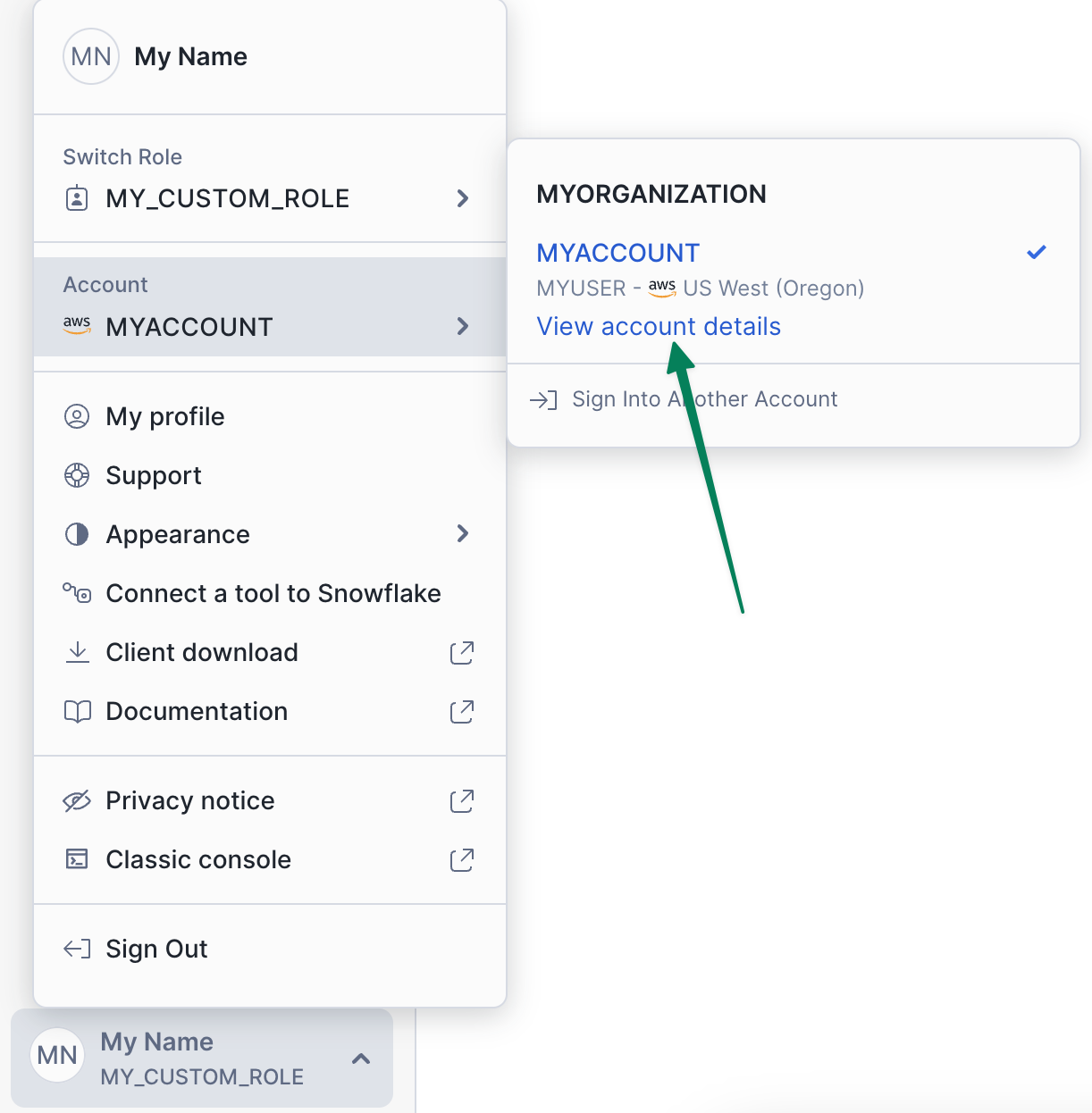
Visit your Snowflake account. Click on **"View account details"** as shown in the screenshot below, and send the listed *Data Sharing Account Identifier* to Grid Status.
### How to Add a Private Listing
1. Once we share the listing, you’ll receive an email stating the data product is ready to be added to your account.
2. If you don’t receive the email, you can also manually add the dataset:
* Log in to your Snowflake account
* Go to **Data Products → Private Sharing**
* Find and accept the listing
### What data is available on Snowflake?
Nearly all of our data is available on Snowflake within 1-2 minutes of being published via our API.
To check a specific dataset, look for "Available on Snowflake" in our [data catalog](https://www.gridstatus.io/datasets).
---
# Agent Instructions
This documentation is published with GitBook. GitBook is the documentation platform designed so that both humans and AI agents can read, navigate, and reason over technical content effectively. Learn more at gitbook.com.
## Querying This Documentation
If you need additional information that is not directly available in this page, you can query the documentation dynamically by asking a question.
Perform an HTTP GET request on the current page URL with the `ask` query parameter, and the optional `goal` query parameter:
```
GET https://docs.gridstatus.io/developers/snowflake-guides/getting-started.md?ask=&goal=
```
`ask` is the immediate question: it should be specific, self-contained, and written in natural language.
`goal` is optional and describes the broader end goal you are ultimately trying to accomplish on behalf of the user. GitBook uses it to tailor the answer towards what is most useful for that goal.
The response will contain a direct answer to the question and relevant excerpts and sources from the documentation.
Use this mechanism when the answer is not explicitly present in the current page, you need clarification or additional context, or you want to retrieve related documentation sections.
.png?alt=media)